


Length Modifier
Length operator modifies the length of guides or hair. It can decrease the size of each strand or increase it by making it longer. Length can be specified on a global level or it can vary through the hair structure depending on user-specified map and channel values.
Parameters
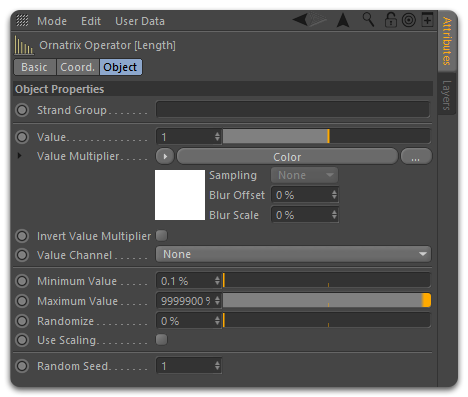
- Strand Group
Allows you to isolate the effect of this operator by selecting a particular Strand Group created in the Edit Guides modifier. - Value
Multiplier for strand lengths. Value of 1 means the length remains the same. Value of 0.5 means the strands will be half as long. - Use Scaling
When on the strand length will be changed by uniformly scaling all points on the strand, preserving its overall shape. - Use Absolute Length
When on, set absolute strand length value in world units instead of a scaling factor. - Scale Width
When on, the width values of the hair will be adjusted based on how the strand lengths are changed. - Value Multiplier
Here you can use a map to control the length of the hair and create different effects. For example, to have shorter strands where the hair merges with the skin. - Minimum Value
After applying randomization and maps the value will not be allowed to be lower than this parameter. Use this to clamp the size of short strands. - Maximum Value
After applying randomization and maps the value will not be allowed to be higher than this parameter. Use this to clamp the size of long strands. - Randomize
Allows adding some randomness to the strand lengths. Value of 0 means all strands will have the same length value applied. Value of 1 will completely randomize applied strand lengths.
Curved Extensions
The Length operator can extend strands beyond their original length. By default, extensions are added as straight segments, which can produce an artificial look when lengthening strands that have a natural curve. The Curved Extension option avoids this by extending strands in a way that preserves their curved shape, continuing the existing curvature instead of appending a straight tail, for a more natural-looking result.
This is especially useful when increasing the length of hair that bends or coils.
- Curved Extension
When on, strands are extended in a way that preserves their curved shape, producing a more natural look. This option is particularly useful when lengthening strands to avoid an artificial straight appearance.
Length Brush
The Length operator functionality is also available as a brush tool within the Edit Guides operator. The Length brush includes the same Curved Extension option, allowing you to interactively extend or shorten specific strands while maintaining natural curves during the grooming process.