


Moov Physics modifier
Moov Physics is our in-house physics engine designed to provide the artist and TDs with different algorithms to simulate hair movement. This operator provides a simple interface to work with hair simulation in real-time and a set of Python scripts that offer different functionalities. TDs have the possibilities to expand MoovPhysics developing their own Python scripts to achieve even more complex and accurate simulation.
|
Moov Hair Simulation |
Moov Simulation Parameters
In Moov Physics all the parameters are divided in different groups related to its functionality. In this section we will define every parameter found in each group.
Solver Parameters
This group includes the global parameters used for tuning up the particle solver. These global parameters influence the whole simulation and the behavior of all the other parameters.
Note: These parameters are temporarily exposed to the user for feedback and development but all tuning of the hair simulation should be done without tweaking the Solver Parameters. If these are changed the entire behavior of the simulation will change and the rest of the parameters would have to be adjusted from the start.
- Substep Count
Number of simulation steps within a single animation frame (default 50). More substeps make the simulation more accurate - hair stretches less, holds its shape better and collides more reliably - at a higher cost. With Time Consistent Stiffness on, the substep count does not change how stiff the hair is, only how closely the simulation reaches it.
- Iteration Count
Number of constraint iterations in each substep (default 1). Spending the budget on substeps is usually more effective than on iterations: 50 substeps of 1 iteration are considerably more accurate than 10 substeps of 5.
- Time Consistent Stiffness
When on (default), the stiffness and drag values describe the same material at any frame rate and substep count. They are calibrated to 30 frames per second with 10 substeps, so at that setting the result is the same as with the option off. When off, stiffness and drag apply per simulation step, as in earlier versions, which makes hair stiffer and more damped as the substep count or frame rate rises. Scenes saved with earlier versions keep their previous behavior.
- Direct Rod Solve
When on, the stretch and bend constraints of each strand are solved together instead of one at a time. A single iteration then reaches the stiffness values, so fewer substeps give the same or better accuracy: 10 substeps of 1 iteration are typically more accurate than the default 50, at a fraction of the cost. Collisions still depend on the substep count, so keep at least 10 substeps when strands collide with meshes or with each other. Off by default.
- Velocity Limit
Maximum speed of particles in the solver. Use to impose a speed limit on fast-moving hair simulations.
- Collision Tolerance
Defines the collision distance between the hair and the mesh objects in the Collision Meshes list. This parameter affects all collisions in the simulation uniformly. Using values that are too low could give unpredictable results, the default values should be enough in most cases.
Hair Model
- Lattice Count
Number of simulation particles corresponding to each hair vertex. Lattice Count = 1 corresponds to simple longitudinal particle chains. A lattice can be used to simulate some twist response in models with only distance and bending constraints (i.e., non-Cosserat and non-elaston models). Cosserat models are preferred for applications where twist is important (e.g. propagated strands).
- Lattice Size
Distances between the particles of a lattice node (corresponding to a single hair vertex). To have meaningful lattice twist, the Lattice Size value has to be comparable to the distance between neighbour strand vertices.
- Lattice Stiffness
Stiffness parameter of lattice nodes (used for constraints within a single lattice node).
- Model Type
Determines the constraints applied to the hair particles. See the overview of hair model types.
- Use Compliant Constraints
Uses compliant versions of the constraints needed by the hair model. Compliant constraints have a slight computational overhead, but are more stable, so their use is recommended when simulation stability is a concern. There are several important differences in the behaviour of compliant vs. non-compliant constraints:
compliant constraints have unbounded stiffness (i.e. the stiffness can be arbitrarily large). The stiffness response is limited, however, so increasing the stiffness beyond a certain value will have no further effect. The stiffness response of compliant constraints depends on particle mass.
- Limit Stretch
Creates Long-Range-Attachment (LRA) constraints to limit strand stretching. LRA constraints are distance constraints linking all strand particles to the root. They react only to stretching (not compression) and allow for a 10% length increase before they kick in. The constraint stiffness is taken from the Stretching Stiffness parameter.
Hair Properties
- Stretching Stiffness
Stiffness parameter controlling longitudinal strand stretching. Should be between 0 and 1.
- Bending Stiffness
Stiffness parameter controlling strand bending. This is applied to any constraints that serve to limit strand bending, depending on the model. In Cosserat models, this is also the twisting stiffness.
Forces and Fields
- Gravity
Vertical gravitational acceleration. Use to impose appropriate length units in the scene: e.g. if the scene units are centimeters, set this parameter to -981 (cm/s^2); if the scene units are meters, set it to -9.81 (m/s^2).
- Gravity Scale
Scales the gravitational field felt by the hair. Use this parameter to modify the stiffness response when the StretchingStiffness and BendingStiffness do not allow sufficient flexibility in hair setup. For example, if the hair is too stretchy even at maximum stiffness, increasing this parameter will lead to stiffer strands. Note that this parameter affects only the stretch of free-falling hair. Inertial stretch (i.e. stretch due to a fast-moving base mesh) is not affected.
- Drag
Multiplies the velocity of each particle at each simulation step. Should be smaller than 1 to avoid instabilities. Use to introduce damping (energy loss) in the system; the smaller the value, the larger the damping.
- Attract To Initial Shape
Creates springs that attract each strand to its initial shape.
- Attract To Initial Shape Stiffness
Determines the spring stiffness. Unlike constraint stiffness, this value can be arbitrarily large.
Note:
For consistency with other stiffness parameters, internal scaling is applied to make sure that values of 0-1 are meaningful. The scaling constant can be changed to obtain satisfactory defaults.
Collisions
- Collide With Base Mesh
Turns on collisions between hair particles and the base mesh.
- Collide With Meshes
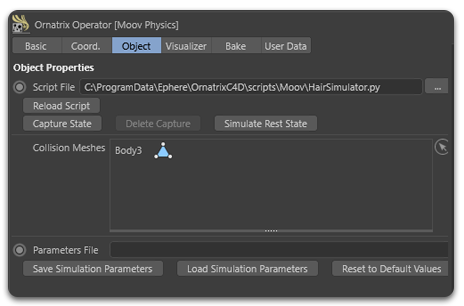
Turns on collisions between hair particles and collision meshes added in the Collision Meshes box.
- Collide With Hair
Turns on hair-hair collisions. These are implemented by creating capsules for each hair segment. Capsules can only collide with each other.
- Collide With Hair Radius
Defines the radius of hair strands for hair-hair collisions.
Group Holder
The group holder creates constraints to hold together each group of strands. The constraints are created between randomly selected particle pairs within a certain range of strand vertex indices (min and max position).
- Group Channel
Selects a channel containing strand groups.
- Group Holder Pos Min
First strand vertex index (from root to tip) of the group holder.
- Group Holder Pos Max
Last strand vertex index (from root to tip) of the group holder.
- Group Stiffness
Stiffness of the group holder constraints.
- Group Random Seed
Random seed for choosing the particle pairs for the group holder.
- Group Max Constraints
Maximum number of constraints per strand group.
Wind
Moov in Cinema 4D does not read Cinema 4D force objects such as Wind or Turbulence. Wind is added with a simulation script that ships with Ornatrix instead:
- Select the Moov Physics object and click the folder button next to Script File.
- Open
HairSimulatorWind.pyfromC:\ProgramData\Ephere\OrnatrixC4D<version>\Scripts\Moov, for exampleC:\ProgramData\Ephere\OrnatrixC4D2026\Scripts\Moov. ProgramData is a hidden folder, so type the path into the file dialog if you don't see it. - A Wind group appears at the bottom of the Moov parameters. Turn on Use Wind.
- Use Wind
Turns the wind force on or off.
- Wind Velocity X/Y/Z
Direction and speed of the wind in world space, in scene units per second (cm/s in a centimeter scene). Start with a value of 100 to 200 on one axis and adjust from there. The values can be keyframed to make the wind change over time.
- Wind Friction
Controls how strongly the hair is pulled toward the wind velocity. At 0 the wind has no effect, at 1 the hair follows the wind most closely.
- Turbulence
Adds gusts by varying the wind strength over time and along the strands. Set to 0 for a steady wind.
Overview of hair model types
Here is a basic benchmark for a hair simulation (rev. 13883) with the main hair models. The simulation has 300 guides with 10 points per guide and runs over 100 frames in the Cinema 4D GUI; all parameters are script defaults except the model type.
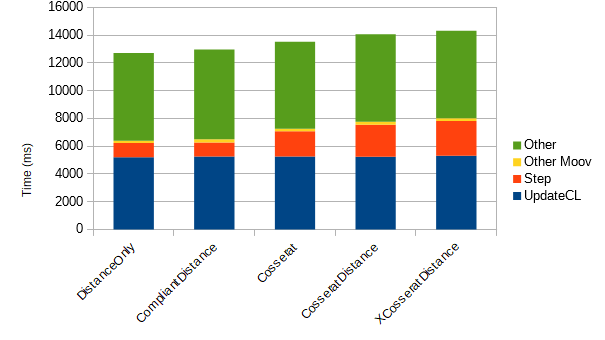
The total time difference between the fastest to the slowest model is about 13%; the difference in solver running time is more substantial (about 25%). The differences between compliant and non-compliant versions of different models are negligible; using the compliant versions is recommended.
Distance Only
A model using only distance (spring) constraints. Constraints are created along each strand between first neighbours (to control stretching) and second neighbours (to control bending), with the corresponding stretching and bending stiffnesses.
This model is the fastest, but has somewhat unrealistic bending (strands tend to buckle). To add some degree of twisting response, it is necessary to create a lattice.
Distance Bending
This model uses distance constraints between first neighbours to control stretching and three-particle bending constraints at each strand vertex for bending control.
Bending is more realistic than the DistanceOnly model, but hair tends to be too stretchy. Similar to the previous model, a lattice is needed for twisting response.
Cosserat
Uses two-particle stretch-shear and three-particle bend-twist Cosserat rod constraints, with the corresponding stretching and bending stiffnesses. Slower than the previous models, but the strands have full elastic response.
Cosserat Distance
Like Cosserat, but creates additional first-neighbour distance constraints to control overstretching.