


Merge Strands
Overview
Merge Strands takes two or more input hair or guide objects and combines them into one object. This can be useful when you have two grooms which are generated and styled separately on the same character, which you want to become a single groom without losing the creation history.
Note: Merging assumes that all input strands have been planted onto the same distribution surface.
Merging grooms
The Merge operator is simple to use. Add the Merge operator at the level of the stack where you want to merge the two objects.
In this example the merged object will not be affected by the operators applied before it: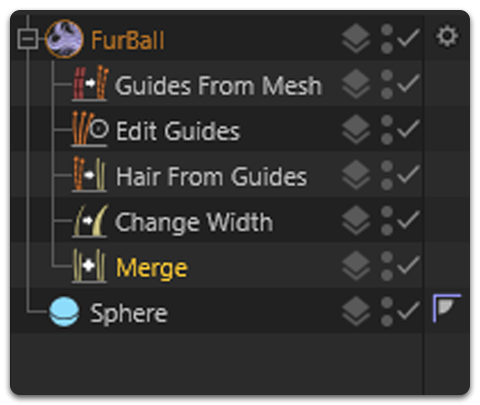
In this example the merged object will be affected by the operators applied after it. For instance, the Change Width operator will affect the strand width of all the merged hair objects: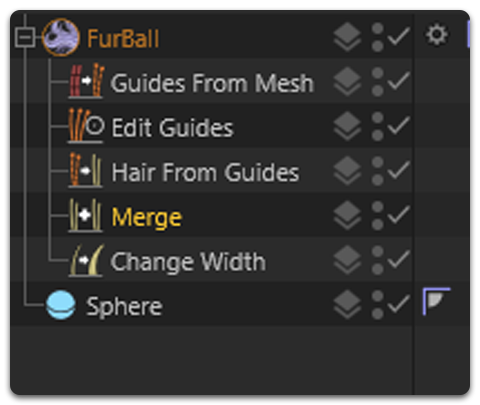
In the Merge operator, click the Add button and then click on a hair object in the viewport to add it to the Merged Strands list. In the following image, two hair objects have been added to the Merged Strands list: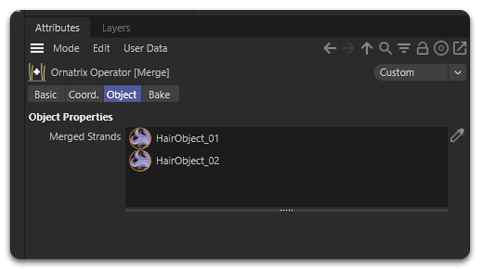
Overlap Resolution
When merging grooms, you may encounter overlapping hair between the sub-grooms. Ornatrix can detect this overlapping hair between the merged inputs and resolve or blend it, so that the combined groom reads as a single, coherent result rather than two grooms sitting on top of each other.
Overlap Resolution Options
The Merge operator provides the following options to handle overlapping hair:
- None (default) - No overlap handling; grooms may overlap
- Remove - Removes overlapping hair strands
- Blend - Smoothly blends the sub-grooms together, eliminating sharp transitions
(screenshot needed)
Distance Threshold
When using overlap resolution, you can adjust the Distance Threshold parameter to control which strands are considered overlapping. This helps fine-tune the merge result.
(screenshot needed)
Strand Groups
Each merged object brings its own strand group numbering with it, so groups coming from different objects overlap: two objects which both use group 1 cannot be told apart after the merge, and objects with no strand groups at all end up in group 0.
Turn on Concatenate Strand Groups to have the merge renumber them instead. Every merged object receives a range of group values that no other merged object uses, so an operator placed above the merge can target one object's strands on their own. An object which carries no strand groups of its own counts as a single group, so merging several plain hair objects gives one group per object.
The option is off by default, and the object the Merge operator is applied to keeps the groups it already had - only the merged objects are renumbered.